Wednesday, 9 November 2016

Work Life Balance

I just started a new job which I love.  I am staying up too late at night working - but not because I have to but because I want to.  I am so excited about all the new learning and invigorated by the task set before me.  I have always been a hard worker.  I am often called a workaholic.  My mind just doesn't shut down, and I love to be busy.  The problem with this is that I often have trouble with my work-life balance.  I have noticed lately I have less patience with my kids and I'm not sleeping or eating how I should be.  (I have put exercise back in as a priority - I am typing this as I am on the treadmill.)   One of the foci of my district is mental health and so I know I need to fix this.  Today, the universe stepped in.


This morning as I drove from school to school, I was listening to Gretchen Rubin's Happier podcast.  (I have a major obsession with podcasts that you can read about here, and another one of Rubin's podcasts inspired the writing of my work manifesto.)  She and her co-host sister brought up Gretchen's Essential 7.  According to Rubin there are 7 basic habits we need to make or break to make life happier.  They are as follows:

1. Eat and drink more healthfully (e.g., give up sugar, eat more vegetables, drink less alcohol)
2. Exercise regularly3. Save and spend wisely (e.g. save regularly, pay down debt, donate to worthy causes, make purchases that contribute to happiness or habits, pay taxes, stay current with expense reports)
4. Rest, relax, and enjoy (e.g, pursue a hobby instead of cruising the internet, enjoy the moment, stop checking email, get enough sleep, spend less time in the car, take time for myself)
5. Stop procrastinating, make consistent progress (e.g., practice an instrument, set aside two hours daily for uninterrupted work, learn a language, maintain a blog, keep a gratitude journal)
6. Simplify, clear, and organize (e.g., make the bed every day, file regularly, put keys away in the same place, recycle, give away unused clothing)
7. Engage more deeply—with other people, with God, with yourself, with the world (call family members, read the Bible every day, volunteer, spend time with friends, observe the Sabbath, spend time alone in nature)
I got to thinking if this would help me with my work-life balance.  I figure it is worth a try.  So I present my Essential 7 - in hopes that these will help me balance.  
Note: While I do not remember exactly what Gretchen (or maybe Elizabeth) said, they did say something to the effect that the "promises" should not be too big or far-reaching as those kinds of promises are not easily kept.  I point this out for me as much as my readers so I can make small promises without feeling like I am copping out.
Here goes:
1. Eat and drink more healthfully: no more night snacking.  I will brush my teeth when the kids go to bed to avoid this.  Not sure how I will make that work at book club.
2. Exercise regularly: Back on the treadmill.  3-4 times a week.  4KM min.  I feel putting my desk on the mill might be a bit of a bad idea but it is working for now so....3. Save and spend wisely: 24-hour embargo on spending.  I love spending money.  I love internet shopping.  Moving forward, 24 hours must pass before I can buy an incidental.  (Not really work-life balance related but it will help with $ stress.)
4. Rest, relax, and enjoy: Cell phone stays downstairs at night.  This one will be hard because I love reading on my phone before bed and I use the flashlight on it to kiss the boys goodnight...BUT I think I also use those as excuses to do work/read about work stuff in bed.
5. Stop procrastinating, make consistent progress: Keep sketchnoting.  I wrote about this yesterday and commented on how it keeps me focused.  If I can monotask I think I will create fewer little meaningless tasks for myself that are work related.
6. Simplify, clear, and organize - I don't think I'm going to do this one as I am a compulsive organizer and it takes time away from what I am trying to accomplish. 
7. Engage more deeply: Make time to play with the boys more.  At least 3 nights a week work/dinner making or clean up goes on hold and we play (like monopoly last night) together, no just near each other.
I think these will all help me - wish me luck.
Think you could be happier?  Why not come up wth your own list?

Tuesday, 8 November 2016

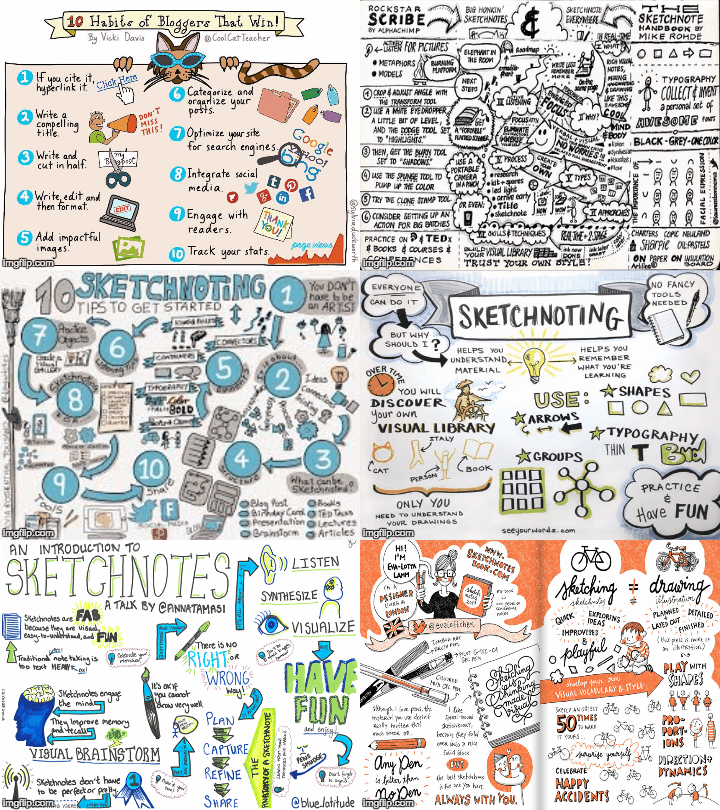
Sketchnoting

Today, I had the honour of supporting Debbie Donskey in a talk about Sketchnoting to Principals in my district.


I am new(ish) to Sketchnoting but I love it.  Here is why:
  1. It exercises a different part of my brain.  This article has great links to all the mental benefits of art including stress relief and increase in critical thinking skills.
  2. I pay better attention.  Studies have shown that when you doodle, you don't daydream.  I would build on that by saying when I Sketchnote, I don't multitask.  I don't feel compelled to check my e-mail, or twitter, or talk to my neighbour.  I become immersed.
  3. I remember more than when I take notes on my computer.   This is not a new idea.  Studies in the last few years have shown that "those who took longhand notes outperformed laptop participants... [Since] longhand notes contain students’ own words and handwriting, they may serve as more effective memory cues by recreating the context (e.g., thought processes, emotions, conclusions) as well as content (e.g., individual facts) from the original learning session".
  4. It perks curiosity & encourages discussion.  I love pulling out my markers and putting them on the table - that moment I get the looks, before the questions.  I also love leaving my Sketchnotes around.  Recently, I left my notebook open on a counter at home.  My husband came in and started reading them and we engaged in a great discussion around reconciliation.  This would not have happened with regular point-form notes.
  5. It is personal.  Sketnoting makes my notes mine.   I don't feel bound when I Sketchnote.  I love this because as this article states: '[t]he most important function of...notes should be for the note-taker to recall and understand what was said. So it makes sense to allow [people] to take notes in a way that is meaningful to them". ()
Curious?  Want to give it a try?  Here are some tips & resources:
  1. Watch this playlist. It is (a short) one I compiled when I started Sketchnoting and it helped me understand how others framed their notes.  That said, realise that the notes need to be your own.  When I started, I felt I needed to include a certain colour code, certain shape, perfect little cartoon people and when I didn't I gave up for a while.
  2. Find web resources that speak to you.
    1. Canadian superstar teacher Sylvia Duckworth (who gave me a hug a few weeks ago) is a guru with a great site
    2. Kathy Schrock's phenomenal Sketchnoting website.
    3. Sketchnote Army has a blog and resources
    4. Vicky Davis, The Cool Cat Teacher has a great resource site
  3. Start slowly and in a low-risk environment.  I started Sketnoting while listening to audiobooks.  I found it was easier since I could pause, rewind, and take breaks.
  4. Remember you don't need to get all the information.  Capture what is important to you.  (See point 5 above.)

So I challenge you...try Sketchnoting this blog post - either your notes or reactions, take a picture and leave it in the comment section.

Monday, 7 November 2016

Who is Visiting? Authentic Audience with Revolvers Maps for Blogs

I spent the better part of the weekend thinking about the fact that someone (or many someones) in California, Bulgaria, India, and The Philippines have visited my blog.  How do I know?  Revolver Maps.  

Revolver Maps is a great little widget you can add to a blog that collects "real-time visitor statistics widgets for your website or blog" (https://www.revolvermaps.com).  Basically, it embeds a cute little globe on your blog that has little red dots - each representing places around the world from which your blog was accessed.  (Have a look at mine - it is on the left under by bio, or the 2D version below.)  It is free, customizable, and easy to install. Most importantly, as an educator, it made me so excited about the power of one little red dot


Map


The more I got caught up in my excitement that my ideas were being shared around the world, the more I thought about the effect that this phenomenon would have on students.  I am a big advocate for students to create products that will be seen by a global audience.  I really feel students get caught up in playing the game of school.  You know the one - "Hi teacher, tell me what you want me to say, I will say it and then I get an 80+%".  When we create environments wherein products are seen by the teacher alone, the students only cares about one person and thus fits work into a mold.  Taking products global makes the audience authentic and thus the students are not bound by what they feel one person will think but rather they must think larger scale.  Imagine the power of having students blog and installing this widget on the blog!?!  Quickly the students must become more critical in their thought process: how would multiple people critique this work?  Their work becomes about how they want to represent their thoughts, not about what one evaluator wants to see.  That's a great way to build 21st Century thinkers - that's a lot of power for a little red dot.


Note: Within 15 minutes of posting this I had hits in California and Florida.  I am in Ontario.  #newsspreadsfast


Friday, 4 November 2016

Publishing Google Slides to the web

Sometimes you might want to share a slide deck outside a typical presentation format...maybe you want to embed one into a website...like this:


Here is how:
  1. Create a slide deck.
  2. Select all the slides on the left-hand side of the slide deck (you know they are selected when they are outlined in blue)
  3. Go to "File" --> "Publish to the web"
  4. A box will pop up. There will be two options (1) "Publish to Web" or (2) "Embed" (in a website, like above)
  5. Under "Auto Advance Slides" select how long you want each slide to display 
  6. Click both check boxes ("Start slideshow as soon as the player loads" & "Restart the slideshow after the last Slide")
  7. From the drop down menu select how long you want each slide to display (3 seconds is the default)
  8. Press "Publish"
  9. A link or embedding code will show up for you to copy.
  10. To stop publishing, click the "Published Content and Settings" and select "Stop Publishing" (a dialogue box will pop up to confirm)
Note: Any changes you make to the slide deck will automatically change in the published version (just hit refresh on the browser on which you are watching the slide show.)

Need a visual? 
Check this screencast I created:

Thursday, 3 November 2016

Fun (but sort of useless) tip from T-Dub

Today at work my colleague Trevor showed me two neat-o tricks I wanted to share.

1) Google Docs formatting - in fairness this is Sultan's trick but since Trevor taught me he gets credit.

If you copy and paste something into a Google Doc using CMD+V (on a mac) it imports with the original source's formatting.  To adjust the formatting to match the formatting in your document hold down CMD+Shift+V.  Voilá - formatting matched.

2) Sending iMessages with effects

image from: https://www.imobie.com/support/send-imessages-with-bubble-effects-in-ios-10.htm
Did you know you can spice up your iMessages with lasers, balloons, and other fun features?   How you ask? Compose a message and instead of hitting the blue up arrow, hold it.  A list of features will appear!  You can change the background to fireworks or make the message appear gently.  The whole list is here.

Happy formatting!  :)

Wednesday, 2 November 2016

Coding Across the Curriculum

When I was in the 10th grade my parents insisted I take a computer class in school.  I resisted saying I had no interest but they were relentless.  They were sure computers were going to be essential in my future.  Little did they know!

One of my new hobbies is coding.
In September, Apple launched a new app called Swift Playground.  My son and I quickly became addicted.  (Pokémon talk went silent for about a week and it was blissful!)  We loved watching the little alien walk around collecting gems and toggling switches.  I watched as my 6 year old patiently thought through the steps needed to solve each puzzle.  I was amazed.  This is a kid whose teachers tell me he needs to slow down and not rush through his work.  I knew instantly that we were on to something.  

Two weeks ago I brought home a Dash and Dot robotic kit.  All three of my kids took turns using the iPad to come up with the right path to manoeuvre Dash around a couple of boxes we had set out.  Again, my six year old patiently clipped together code to make the robot perform a set of instructions.  His eyes would light up with excitement once he played his code to see if he had succeeded in the task.  Moreover, when his code failed, he didn't pitch a fit (as I was expecting) but came back and reviewed his coding.

I began to think about how this "playing" was such rich teaching.  It involved problem solving, collaboration, reflection, and critical thought.  For a minute I wished I was a Computer Science teacher. then I realised the power of coding across disciplines.

Since most of my background is in English Language and Literature, I began to think about coding and storytelling.  Imagine the power of having students write a story about Little Dash and Dots journey.  It could work either way.  A student could write a story about the journey or a student could code the robot based on a story.  They could pair up and switch.  Students could reflect on challenges and successes in coding.  Why not dress a robot up like a character and set up a course which mirrors the events of a story or novel.  The list in my head went on and on.  This was only for one robot!  I was pumped.

As I continue to explore this new hobby, I am going to an apple workshop next week and helping some schools plan some Hour of Code activities.  I am pumped.  Stay tuned!


Tuesday, 1 November 2016

#NaBloWriMo


Reflection is so important in education.  As a teacher, I always felt I never had my students do it enough.  I myself did it daily - but not formally.  I had fleeting moments or thought.  I had short (or sometimes long) conversations with colleagues.  In my new job at Digital Literacy Resource Teacher (DLRT), I am not doing it enough.  I am so caught up in the learning and doing that I am not taking the time to reflect and digest my day to day.

In November a few years ago, a colleague (Elise Abram) challenged the students at the school to participate in National Novel Writing Month (NaNoWriMo) wherein one commits to writing a certain number of words each day that would essentially yield writing a novel in a month.  Ambitious.  While I have no intentions of novel writing right now, I have decided, to ensure I am more reflective (and/or sharing more), to write a blog post every work day in November.  Ambitious.  I am calling it #NaBloWriMo.

I have had a lot of people tell me they admire my intent.  They say they would not have time.  I have two responses:

1) You make time for what you feel is important.  I learned this when my middle son was in the hospital last December for a week.  I never thought I could miss a week of school, or be away from my two other kids for a week...but I did...and it was fine.  I found a way to make it work.  (Willy is fine by the way.)

2) I know time is going to be an issue.  New, full-time job with a learning curve so steep it is inverted.  Three kids under 7. Active social life.  Desire to make time for treadmill (easily solved by #TreadmillPD) Yep.  All barriers, but I listened to the most recent EdSurge on Air podcast today sharing Jim Shelton's keynote at iNACOL conference and he said something that struck me: "[barriers present] problems to solve, not reasons for inaction".  I love this.  I don't want to throw my hand up in the air...I want to reflect and I am going to make it happen.   I think it will make me a better educator.

Maybe you'll join me.  Maybe your goal will be to blog once a week..maybe once this month.  Maybe your goal will be different in nature but similar in commitment level.  Make it you...but reflect on what you need and do it.