Tuesday, 15 November 2016

Extensions, Add-ons and Apps

If push came to shove I am not sure I could really tell you the difference between a Chrome Extension, Add-on or App.  Well, maybe the app, but the other two, I'm not sure.  Today, I decided it was time I got it straight.  

After some exploring, I seem to have it.


Extensions are mini-programs that modify and enhance the functionality of the Google Chrome browser. They are the little buttons that appear beside the address bar in chrome.


Add-ons are extra features within Google Drive that enhance its functions.  These are associated with G Suite apps directly.  You find these in under Add-ons on the File Bar.


Apps are like desktop software programs you install on your computer, except that you use them directly within your browser.  You find these when you hit the apps button in the Chrome browser.


So now that that is straight I thought I would share eight of my favourites.


  1. Screencastify Extension - I love this extension.  It allows one to make screencasts.  It is easy, and a great tool for explaining.  The free version allows up videos up to 10 minutes.  This has help me teach and learn.  When I am engaged in new learning on my computer, I will turn it on so I can review later.
  2. Pinterest Extension - I come across so many great articles and tools in my day that I want to explore but don't have time in the moment.  I use the little extension to automatically pin these to boards called "Explore Later", "Read Later", or "Watch Later".
  3. One Tab Extension - My tab get out of control.  I mean I can have dozens open at a time.  This extension collapses them all to one page and I can go back and open them later.  Helps me feel organized.
  4. Ad Block Extensions - Say goodbye to those pesky ads on pages and before viewing YouTube videos.  Now, I will say I find this one is not always 100%...I have heard you need to be registered in an education domain.
  5. Form Mule Add-on (Sheets) - Run personalized e-mails from Google Sheets.  They can be run on triggers of manually.  Be sure to watch your fields if you use it for a while - Google changes things from time to time and it can mess with your settings.  This is a great way to keep parents up to date.  See my colleague Kim Pollishuke's great tutorial on her Weebly page.
  6. docAppender Add-on (Forms) - Append Form responses to a selected Google Doc.  This is a great way to track observations.  See the Inspire and Inquire Website for a great look at how this works.
  7. Choice Eliminator 2 Add-on (Forms) - Ever have a form with multiple choice answers but want to limit the number of people who can choose a choice?  This is the answer.  With Choice Eliminator you can set the number of times an answer is selected then it will disappear as an option. It is a great tool for signing up for presentation dates, parent-teacher interviews, etc.
  8. Copy Folder App - In Google Drive you can copy a file, but not a folder...this can be a nuisance...until you get this app.  


Monday, 14 November 2016

Be careful of changes! Form Mule, Autocrat, etc.

Thanks to Trevor Beck in the EdTechTeam Global Community on G+ for the heads up....


"Changes by Google are going to mess up formMule, Autocrat and other add-ons

It appears that Google has recently made a change to the field that automatically collects email addresses, changing it from <<username>> to <<Email Address>>. As formMule and Autocrat basically create merge messages, it’s still looking for <<username>> and will generate an error in the send status column (e.g. Error: Invalid email: undefined). 


To fix this you'll need to go through all of your spreadsheets and edit your templates..."

Sure enough, my team has been affected already....so while we get really excited about the new Google Form features (upload files!  Woot Woot!) be sure to check that your old loves are not affected.

Saturday, 12 November 2016

The flipped classroom

My colleague Chris beat me to this in his post earlier tonight. So this post is a little of a cheat in that it is a day late and was originally a response to another blog, but I will count it.


The flipped classroom really speaks to me...the first time I heard of it was in 2011 as well. I was on the Go Train coming home from OISE watching Salman Khan speak. I was awestruck...literally yelling at my iPhone in excitement...I am sure people thought I was crazy.

I have tried it and love it...it was recently that I had an epiphany.

My son is now in gr. 1 and he is getting homework. I have some pretty strong feelings around (read against) homework - especially in primary. I should not be having this six-year-old sit at a desk and copy patterns and practice matching pictures to french words. We should be out, exploring this in the world; that's authentic, meaningful learning.

Flipping the classroom makes for rich in class learning, but what about the out of class time it requires? How do we ensure it will get done and/or not turn off the learner (who, in Chris' case, might already be completely disengaged from school) ? What about a student who can't do the work at home - one who has a job to support the family? The student who does not have a home, or work space, or good home life? What can we do (or maybe how do we scaffold) to flip the classroom for these students?

Thursday, 10 November 2016

Micro-credentialing in Education

I heard the term micro-credentialing in education a little while ago.  The idea is that teachers can engage in professional development that earns them credits (often gamified in the form of badges).  Over the last two years, the idea has been revolutionalizing PD delivery and motivating teacher in ways that have never been seen before.


Personally, I love it.  Here is why.
  1. Teacher Autonomy - Micro-credentialing speaks to teacher personal desires.  Rather than being told what they need to learn - be it through their district or a formal learning institution - teachers can pick areas of interest.

  2. Just In Time Learning - Micro-credentialing can provide just in time learning.  Many micro-credentialling courses have multiple entry points or flexible start times.  Teachers can realise a need and find a solution -- and get credit for the learning.

  3. Job-Embedded Learning - Most micro-credentialing calls for learning embedded in a teacher's practices.  The beauty of this is that it is low risk.  Time is our currency in teaching.  If something takes more time then teachers avoid it.  Job-embedded learning allows teachers to engage in learning without the add-on that formal learning often has.

  4. Motivation - Remember when you were a kid and you got badges for passing swimming lessons? Or stickers for getting over 80% on a test?  How about in Brownies or Beavers?


    It was so exciting.  I'm pretty certain many adults haven't changed since those days.  Earning badges is motivating And you get to shoe them off in your signature (rather than your uniform sleeve).  

  5. Small commitment - In the past, teachers needed to commit to a long program like a master's degree for any credentialing.  This was not possible for many teachers due to time and/or financial barriers.  Micro-credentialing is micro-commitment.

Today I got my newest micro-credential - Google Certified Educator Level 2.  What will your be?


Wednesday, 9 November 2016

Work Life Balance

I just started a new job which I love.  I am staying up too late at night working - but not because I have to but because I want to.  I am so excited about all the new learning and invigorated by the task set before me.  I have always been a hard worker.  I am often called a workaholic.  My mind just doesn't shut down, and I love to be busy.  The problem with this is that I often have trouble with my work-life balance.  I have noticed lately I have less patience with my kids and I'm not sleeping or eating how I should be.  (I have put exercise back in as a priority - I am typing this as I am on the treadmill.)   One of the foci of my district is mental health and so I know I need to fix this.  Today, the universe stepped in.


This morning as I drove from school to school, I was listening to Gretchen Rubin's Happier podcast.  (I have a major obsession with podcasts that you can read about here, and another one of Rubin's podcasts inspired the writing of my work manifesto.)  She and her co-host sister brought up Gretchen's Essential 7.  According to Rubin there are 7 basic habits we need to make or break to make life happier.  They are as follows:

1. Eat and drink more healthfully (e.g., give up sugar, eat more vegetables, drink less alcohol)
2. Exercise regularly3. Save and spend wisely (e.g. save regularly, pay down debt, donate to worthy causes, make purchases that contribute to happiness or habits, pay taxes, stay current with expense reports)
4. Rest, relax, and enjoy (e.g, pursue a hobby instead of cruising the internet, enjoy the moment, stop checking email, get enough sleep, spend less time in the car, take time for myself)
5. Stop procrastinating, make consistent progress (e.g., practice an instrument, set aside two hours daily for uninterrupted work, learn a language, maintain a blog, keep a gratitude journal)
6. Simplify, clear, and organize (e.g., make the bed every day, file regularly, put keys away in the same place, recycle, give away unused clothing)
7. Engage more deeply—with other people, with God, with yourself, with the world (call family members, read the Bible every day, volunteer, spend time with friends, observe the Sabbath, spend time alone in nature)
I got to thinking if this would help me with my work-life balance.  I figure it is worth a try.  So I present my Essential 7 - in hopes that these will help me balance.  
Note: While I do not remember exactly what Gretchen (or maybe Elizabeth) said, they did say something to the effect that the "promises" should not be too big or far-reaching as those kinds of promises are not easily kept.  I point this out for me as much as my readers so I can make small promises without feeling like I am copping out.
Here goes:
1. Eat and drink more healthfully: no more night snacking.  I will brush my teeth when the kids go to bed to avoid this.  Not sure how I will make that work at book club.
2. Exercise regularly: Back on the treadmill.  3-4 times a week.  4KM min.  I feel putting my desk on the mill might be a bit of a bad idea but it is working for now so....3. Save and spend wisely: 24-hour embargo on spending.  I love spending money.  I love internet shopping.  Moving forward, 24 hours must pass before I can buy an incidental.  (Not really work-life balance related but it will help with $ stress.)
4. Rest, relax, and enjoy: Cell phone stays downstairs at night.  This one will be hard because I love reading on my phone before bed and I use the flashlight on it to kiss the boys goodnight...BUT I think I also use those as excuses to do work/read about work stuff in bed.
5. Stop procrastinating, make consistent progress: Keep sketchnoting.  I wrote about this yesterday and commented on how it keeps me focused.  If I can monotask I think I will create fewer little meaningless tasks for myself that are work related.
6. Simplify, clear, and organize - I don't think I'm going to do this one as I am a compulsive organizer and it takes time away from what I am trying to accomplish. 
7. Engage more deeply: Make time to play with the boys more.  At least 3 nights a week work/dinner making or clean up goes on hold and we play (like monopoly last night) together, no just near each other.
I think these will all help me - wish me luck.
Think you could be happier?  Why not come up wth your own list?

Tuesday, 8 November 2016

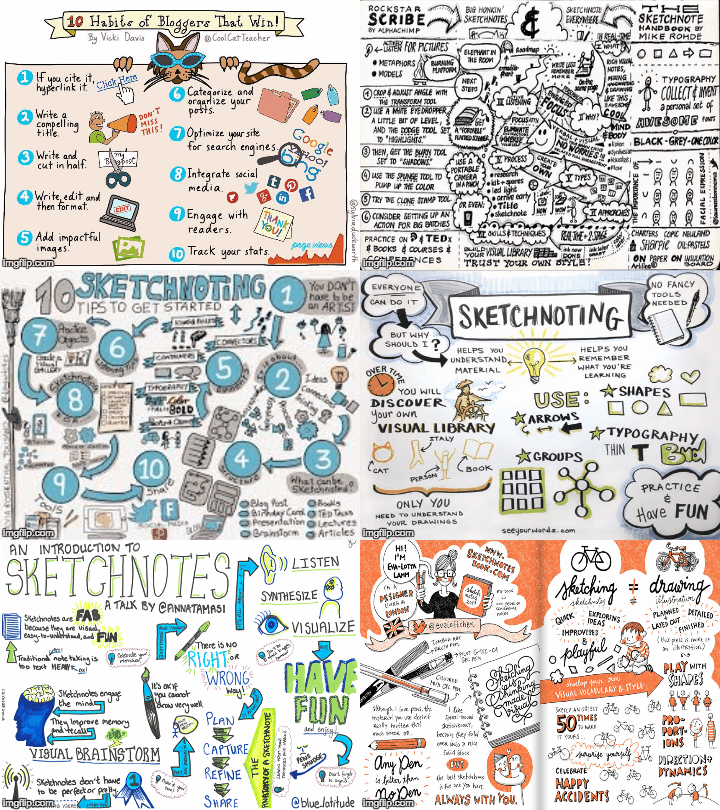
Sketchnoting

Today, I had the honour of supporting Debbie Donskey in a talk about Sketchnoting to Principals in my district.


I am new(ish) to Sketchnoting but I love it.  Here is why:
  1. It exercises a different part of my brain.  This article has great links to all the mental benefits of art including stress relief and increase in critical thinking skills.
  2. I pay better attention.  Studies have shown that when you doodle, you don't daydream.  I would build on that by saying when I Sketchnote, I don't multitask.  I don't feel compelled to check my e-mail, or twitter, or talk to my neighbour.  I become immersed.
  3. I remember more than when I take notes on my computer.   This is not a new idea.  Studies in the last few years have shown that "those who took longhand notes outperformed laptop participants... [Since] longhand notes contain students’ own words and handwriting, they may serve as more effective memory cues by recreating the context (e.g., thought processes, emotions, conclusions) as well as content (e.g., individual facts) from the original learning session".
  4. It perks curiosity & encourages discussion.  I love pulling out my markers and putting them on the table - that moment I get the looks, before the questions.  I also love leaving my Sketchnotes around.  Recently, I left my notebook open on a counter at home.  My husband came in and started reading them and we engaged in a great discussion around reconciliation.  This would not have happened with regular point-form notes.
  5. It is personal.  Sketnoting makes my notes mine.   I don't feel bound when I Sketchnote.  I love this because as this article states: '[t]he most important function of...notes should be for the note-taker to recall and understand what was said. So it makes sense to allow [people] to take notes in a way that is meaningful to them". ()
Curious?  Want to give it a try?  Here are some tips & resources:
  1. Watch this playlist. It is (a short) one I compiled when I started Sketchnoting and it helped me understand how others framed their notes.  That said, realise that the notes need to be your own.  When I started, I felt I needed to include a certain colour code, certain shape, perfect little cartoon people and when I didn't I gave up for a while.
  2. Find web resources that speak to you.
    1. Canadian superstar teacher Sylvia Duckworth (who gave me a hug a few weeks ago) is a guru with a great site
    2. Kathy Schrock's phenomenal Sketchnoting website.
    3. Sketchnote Army has a blog and resources
    4. Vicky Davis, The Cool Cat Teacher has a great resource site
  3. Start slowly and in a low-risk environment.  I started Sketnoting while listening to audiobooks.  I found it was easier since I could pause, rewind, and take breaks.
  4. Remember you don't need to get all the information.  Capture what is important to you.  (See point 5 above.)

So I challenge you...try Sketchnoting this blog post - either your notes or reactions, take a picture and leave it in the comment section.

Monday, 7 November 2016

Who is Visiting? Authentic Audience with Revolvers Maps for Blogs

I spent the better part of the weekend thinking about the fact that someone (or many someones) in California, Bulgaria, India, and The Philippines have visited my blog.  How do I know?  Revolver Maps.  

Revolver Maps is a great little widget you can add to a blog that collects "real-time visitor statistics widgets for your website or blog" (https://www.revolvermaps.com).  Basically, it embeds a cute little globe on your blog that has little red dots - each representing places around the world from which your blog was accessed.  (Have a look at mine - it is on the left under by bio, or the 2D version below.)  It is free, customizable, and easy to install. Most importantly, as an educator, it made me so excited about the power of one little red dot
. 


Map


The more I got caught up in my excitement that my ideas were being shared around the world, the more I thought about the effect that this phenomenon would have on students.  I am a big advocate for students to create products that will be seen by a global audience.  I really feel students get caught up in playing the game of school.  You know the one - "Hi teacher, tell me what you want me to say, I will say it and then I get an 80+%".  When we create environments wherein products are seen by the teacher alone, the students only cares about one person and thus fits work into a mold.  Taking products global makes the audience authentic and thus the students are not bound by what they feel one person will think but rather they must think larger scale.  Imagine the power of having students blog and installing this widget on the blog!?!  Quickly the students must become more critical in their thought process: how would multiple people critique this work?  Their work becomes about how they want to represent their thoughts, not about what one evaluator wants to see.  That's a great way to build 21st Century thinkers - that's a lot of power for a little red dot.


Note: Within 15 minutes of posting this I had hits in California and Florida.  I am in Ontario.  #newsspreadsfast